

downloading ?
- Thread starter Tha Mack
- Start date


ExtractNow
http://www.extractnow.com/
Features
Supports ZIP, RAR, ISO, BIN, IMG, IMA, IMZ, 7Z, ACE, JAR, GZ, LZH, LHA, TAR, SIT archive formats
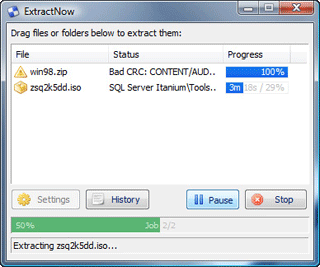
Drag and drop files or folders from Windows Explorer to extract them
Simple user interface and sleek design in a small package
Recursively search through folders for archives (Just drag and drop them)
Delete files or close program after extraction options
Windows explorer file associations for all supported archive types
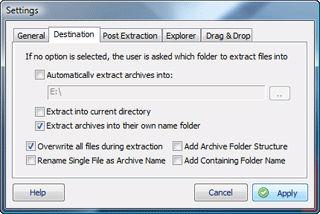
Extract files into current directory, named folder, or favorite folder of choice
System tray icon on Minimize and Always on top features
Integrates with Windows Explorer via special context menu items
ExtractNow is a simple utility that allows you to extract multiple archives quickly and easily. ExtractNow is not a complete archival solution. It's main purpose it to allow the user to extract multiple archives easily.
Why wear out your clicking finger extracting files one by one when you can extract at once? ExtractNow does a fine job of bundling compressed files and extracting their contents in one fell swoop. ExtractNow has a clean, well-designed and easy-to-use interface. To extract files, simply drag and drop them into the main program window, or right-click the files while in Windows Explorer. ExtractNow supports the two most popular compression formats, ZIP and RAR, as well as a handful of other formats. Simple but not simplistic, this is a powerful and reliable program that will be of use to anyone who manages many compressed files.
(Download.com Editor's Review)
http://www.extractnow.com/
Features
Supports ZIP, RAR, ISO, BIN, IMG, IMA, IMZ, 7Z, ACE, JAR, GZ, LZH, LHA, TAR, SIT archive formats
Drag and drop files or folders from Windows Explorer to extract them
Simple user interface and sleek design in a small package
Recursively search through folders for archives (Just drag and drop them)
Delete files or close program after extraction options
Windows explorer file associations for all supported archive types
Extract files into current directory, named folder, or favorite folder of choice
System tray icon on Minimize and Always on top features
Integrates with Windows Explorer via special context menu items
ExtractNow is a simple utility that allows you to extract multiple archives quickly and easily. ExtractNow is not a complete archival solution. It's main purpose it to allow the user to extract multiple archives easily.
Why wear out your clicking finger extracting files one by one when you can extract at once? ExtractNow does a fine job of bundling compressed files and extracting their contents in one fell swoop. ExtractNow has a clean, well-designed and easy-to-use interface. To extract files, simply drag and drop them into the main program window, or right-click the files while in Windows Explorer. ExtractNow supports the two most popular compression formats, ZIP and RAR, as well as a handful of other formats. Simple but not simplistic, this is a powerful and reliable program that will be of use to anyone who manages many compressed files.
(Download.com Editor's Review)


